Comodo Firewall Pro 3.0 is free firewall software that is top-rated in three leading computer magazines as the best free firewall. This software can protect your system against external attacks by hackers as well as internal attacks such as malicious software and Trojan viruses.
Comodo Firewall Pro is a powerful firewall with countless features. It continuously monitors your system Internet activity and gives you the ability to control them. The latest version of Comodo Firewall uses new technology architecture platform that prevents malicious software from gaining access to the computer and allows only known programs to be installed. This new technology is a new approach to computer security solutions. It tries to keeps your system virus free versus the traditional, "detection based" security solutions that allow all programs access to the computer system and then try to "detect" infected or damaged files by identifying the file’s signature.
The program has improved user interface that provides easy and quick navigation between each module of the firewall. Comodo Firewall is simple for beginners and at the same time it provides a great number of information and options for advanced users.
There are four main tabs: Summary, Firewall, Defense +, and Miscellaneous. Each of them provides quick access to relevant security tasks.

Summary screen gives you a snapshot of your current security settings and allows you a quick access to all parts of the Comodo Firewall.

Firewall screen are divided into two sections: Common Tasks and Advanced. The first one allows you to create rules for programs and network connections through a series of shortcuts and wizards, and the second enables more advanced users to determine firewall policy and settings at an in-depth, granular level.

The Defense+ tab of Comodo Firewall Pro allows you to quickly configure all aspects of so called host intrusion prevention system that monitors the activities of all applications and processes on your system.
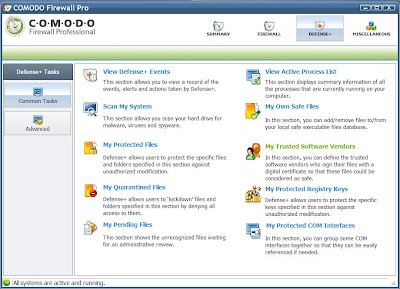
Comodo Firewall Pro gives you the ability to quickly customize the behavior of the Defense system by changing your security level.

Comodo Firewall Pro 3.0 is compatible with Windows XP and Vista OS. It offers more features than many paid firewalls for free.
I think Comodo Firewall Pro 3.0 will be the best choice for everyone who looks for quick and reliable firewall that comes for free.
You can download the latest version of Comodo Firewall Pro from this page.
Comodo Firewall Pro is a powerful firewall with countless features. It continuously monitors your system Internet activity and gives you the ability to control them. The latest version of Comodo Firewall uses new technology architecture platform that prevents malicious software from gaining access to the computer and allows only known programs to be installed. This new technology is a new approach to computer security solutions. It tries to keeps your system virus free versus the traditional, "detection based" security solutions that allow all programs access to the computer system and then try to "detect" infected or damaged files by identifying the file’s signature.
The program has improved user interface that provides easy and quick navigation between each module of the firewall. Comodo Firewall is simple for beginners and at the same time it provides a great number of information and options for advanced users.
There are four main tabs: Summary, Firewall, Defense +, and Miscellaneous. Each of them provides quick access to relevant security tasks.

Summary screen gives you a snapshot of your current security settings and allows you a quick access to all parts of the Comodo Firewall.

Firewall screen are divided into two sections: Common Tasks and Advanced. The first one allows you to create rules for programs and network connections through a series of shortcuts and wizards, and the second enables more advanced users to determine firewall policy and settings at an in-depth, granular level.

The Defense+ tab of Comodo Firewall Pro allows you to quickly configure all aspects of so called host intrusion prevention system that monitors the activities of all applications and processes on your system.

Comodo Firewall Pro gives you the ability to quickly customize the behavior of the Defense system by changing your security level.

Comodo Firewall Pro 3.0 is compatible with Windows XP and Vista OS. It offers more features than many paid firewalls for free.
I think Comodo Firewall Pro 3.0 will be the best choice for everyone who looks for quick and reliable firewall that comes for free.
You can download the latest version of Comodo Firewall Pro from this page.


