Sunday, July 06, 2008

Adobe Acrobat Reader 9.0 - The Best PDF Viewer

The new version of Adobe Acrobat Reader has been released recently. This free program is designed for viewing and printing PDF files. Acrobat Reader also allows you to fill in and submit PDF forms online.

Acrobat Reader 9.0 - The interface. Working with forms.


The new release is almost identical to Adobe Reader 8 though it does load slightly faster and has some new important features such as built-in multimedia support, a quite nice integration with Acrobat.com for enhanced web-based collaboration, improved security, support for searching all PDFs on a hard drive, and more.
The release of Adobe Acrobat 9 brings new Web relevance to PDF documents by enabling embedded video and animation. In turn, every user of new version of Acrobat Reader can watch movies and play interactive games without opening a third-party media player.
Acrobat Reader 9 has a completely redesigned interface that increases the efficiency of the viewing experience.
The program is integrated with Acrobat.com, an exciting new set of online services from Adobe.
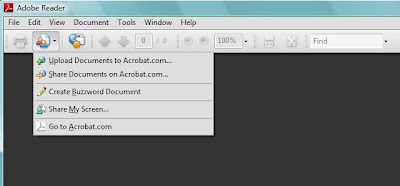
Acrobat Reader 9.0 - The integration with Acrobat.com


That means you can now upload and share PDF files and other types of documents or even create and coauthor documents with others using the PDF writing engine of Acrobat.com

Acrobat.com The new web user experience.


Another interesting feature is so called PDF Portfolios that provide easy navigation when you work with multiple PDF documents and other document types. They also allows you to work with a collection of materials such as drawings, e-mail messages, spreadsheets, and videos as a single file, which makes distribution, storage, retrieval, and collaboration easy for end users.
Acrobat Reader 9 adds more security to your documents by using new digital signature functionality and 256-bit AES encryption.
The program supports many languages and has multilingual user interface.
I think Acrobat Reader has always been the best software for viewing and printing PDF files and now it has become even better.
You can download the latest version of Acrobat Reader here.

Wednesday, May 28, 2008

Opera — The Fastest Browser In The World

Opera browser is a very good piece of work. Billing itself as “The fastest browser on Earth!”, it is a free browser with great number of powerful and useful features.
Opera has clean interface that is very easy to use and understand. It has everything you need to browse the internet and even more.
Opera allows you to open several Web pages in different tabs within a single window. This is called tabbed browsing. You can easily drag tabs, duplicate them and even restore closed tabs. In Opera, you can resize pages and tile them next to each other on the same workspace to compare or work with several pages. The browser has very useful preview tab feature. Just place the mouse arrow over the tab and you will see a thumbnail preview.
The behavior of tabs can be easily configured to satisfy your needs.

Opera tabs management


Standard toolbar includes six basic buttons used to navigate within a document, address field, the search field for quick searching on the Web and the «View» button to toggle the view bar.
The search bar offers you several search engines to choose from. You also can add your favorite search engines to the search bar.

Opera search bar


The view bar allows you to find a specified word in the active Web page, and provides you quick access to voice management (if available) and features that affect the display of the page, such as shortcuts to turn off stylesheets and images, zoom and so on.
Zooming in Opera applies to the entire page at once, instead of just the text. I found this very useful.

Opera view bar


Another great feature of Opera is the sidebar which is placed on the left of the screen space. You can toggle it by pressing F4 key or clicking on the left side of the Opera window.
This sidebar gives you quick access to different panels such as bookmarks, widgets, history, notes, transfers, links and some others. These panels make the work with Opera even easier. You can configure sidebar by adding and removing panels of your own.

Sidebar of Opera


Opera has highly customizable interface that allows you to personalize it by using beautiful skins, removing and adding panels and buttons.

Customizing Opera. Skins


Opera is designed to be the fastest, smallest, and most full-featured browser available. It is really very fast in loading pages. It is definitely faster than Internet Explorer and smaller than Firefox.
The advanced fraud protection of Opera and its anti-phishing detection keeps your browsing safe and secure.
The very interesting feature of Opera is mouse gestures that allow you to do frequently performed browse operations with small, quick mouse movements.

Mouse gestures settings in Opera


Speed Dial is the new and unique feature of Opera that assigns bookmarks and tabs any digit from one through nine. When you enter one of those numbers into the URL bar, the corresponding site loads when you hit enter.

SpeedDial feature of Opera


Opera includes support for BitTorrent so you don't need to download and install a separate BitTorrent program to download large files. Just click on torrent link and start the download.
There are many others features in Opera such as widgets, notes, Wand utility, simple integration with your favorite e-mail and chat clients, RSS feed reader and sessions management. The Opera browser supports many languages and operating systems.
Overall, I think Opera is one of the best browsers for power users who keep many pages open at once and perform frequent downloads. I like it.
You can download the latest version of Opera here.

Sunday, May 11, 2008

Diskeeper Professional 2008 - Powerful Defragmentation Software

Over time your HDD becomes fragmented. As you delete and create files, you create new regions of free space. Your free space is not in one big chunk at the end, but instead just a number of small holes all over your disk. And sometimes it is impossible to allocate new files contiguously, and your operating system has to break them into fragments, putting a small piece here and a small piece there.
File system fragmentation on your HDD can bring unforeseen problems, such as complete slowdown of system performance, slow startup and shutdown, PC crashes and sometimes even to drive failures.
Fortunately for all of us there are a number of programs that are designed to eliminate fragmentation. One of the best programs of this kind is Diskeeper 2008.
Diskeeper 2008 has one of the most powerful defragmentation engines ever developed. Even if your system only has a 1% of free space it can be defragged by this great program.
Diskeeper runs in the background and in real time and automatically defrags your disk when your machine is idle. Thus it can handle fragmentation as it occurs, eliminating the need for manual defragmentation.

Diskeeper 2008 Professional Main Window


Diskeeper 2008 also allows you manually defrag your system. Boot-Time Defragmentation option allows you to defrag your hard drive at boot time, moving files that couldn’t be moved while Windows was in use.
The program can configure the MFTs (Master File Tables - the place where information about every file and directory on an NTFS hard drive is stored) and paging files (a hidden file on your HDD that Windows uses as if it were RAM), preventing them from fragmentation and thus increasing overall system performance.
Diskeeper 2008 includes many others options and features for advanced users.
If you abuse your harddrive with lots of new/updated/deleted files, I would definitely recommend that you try Diskeeper.
You can download the latest version of Diskeeper here.

Friday, May 02, 2008

SPAMfighter – The Easy Way to Fight Spam


If you are tired of getting spam and looking for an Outlook, Outlook Express, or Windows Mail spam filter to block spam from entering your inbox, Spamfighter is the application you are looking for.
SPAMfighter is a pretty popular anti-spam and anti-phishing addon for Microsoft Outlook, Outlook Express, and Windows Mail.
SPAMfighter is very easy to use. Once the program has been installed, you can just forget about it and simply use your email application as before with the significant difference that on around 95% of your spam is gone.
After installation of SPAMfighter, Outlook or Outlook Express gets a toolbar with four new control buttons and a new mail folder for dumping your spam into, called SPAMfighter. Using this toolbar, you can manually block and unblock an email messages. It also gives you access to advanced options of this application.

SPAMfighter toolbar


Program defines unsolicited email by using the power of a very large community of people who instantly report if they receive a spam mail. When several people designate the same letters as a spam, this letters is automatically blocked for the rest of the community in seconds.
If by chance you receive a spam mail in your Inbox, you can report it to the SPAMfighter server and remove it for all other community members with a single click on Block button in the SPAMfighter toolbar.
In addition, SPAMfighter uses special algorithm that filters large amount of spam before it ever hits the community.
SPAMfighter can block incoming mails from specific addresses and domains. To do this, you simply need to create a blacklist. You also can create a Whitelist and add there all your contacts to ensure that they are not filtered.


One of the great features of SPAMfighter is Language Recognition. It allows you to receive or reject only the emails written in the language(s) that you specify.
SPAMfighter is available in many languages, including English, German, Spanish, Chinese, French, Italian, Russian, and many others.
For your first 30 days you get the full Pro version, which keeps your emails free of adverts and offers some advanced features. When the trial period ends, you can either buy SPAMfighter Pro, or be downgraded to the free SPAMfighter Standard.
You can download the latest version of SPAMfighter here.

Monday, April 21, 2008

Google Earth 4.3 is available

Google Earth the 3D global mapping program that combines satellite imagery, aerial photography and the power of Google Search to put the world’s geographic information at your fingertips, has been updated a several days ago.
The new version of the program includes several new and interesting features. First of all Google Earth 4.3 has improved navigation tools, which Google hopes users will find to be more intuitively operable.
The zoom control was modified. Now, when you zoom closer to the ground, your view slowly tilts, as if you are parachuting onto the ground. When the zoom level reaches ground, you are surrounded by the 3D landscape in a view similar to that of a 3D game.

Google Earth zoom feature


In addition, the Google Earth has received new control called “look” joystick. This special joystick lets you to look around and change your viewpoint. It is very handy tool. You can look up at the sky and down at the ground, or over the horizon.

Google Earth good view


Photorealistic 3D-structures finally appeared on Google Earth. The new version of the program, has added a lot of the 3D content. New version lets you view higher quality 3D Buildings - many of which are photo-textured.

Google Earth 3D buildings


Another addition to Google Earth application is Street View feature. It gives Google Earth users an on-the-ground 360-degree view that users may recognize from Google Maps.

Google Earth Street View feature


Lastly, the new sunlight button will give you the ability to see the sunrise and sunset anywhere in the world.

Google Earth sun circle


Google Earth 4.3 is now available for download.